
| Wrong Browser? | Internet Explorer 7 or 8 | Mozilla FireFox | Google Chrome |
|
|
||||
|
How to Reset all saved data in Mozilla Firefox (Warning this
process will erase all saved passwords cookies and settings)
If You have come to the wrong page please visit our login page at
http://myaccount.ohmetering.com
______________________________________________________________________________________
Open Mozilla Firefox
Go to the wrench button on the left and select "Clear Private data"
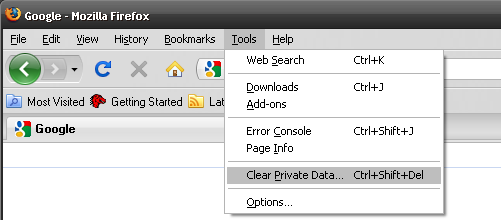
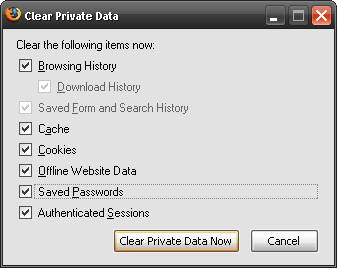
Now this dialog box will appear be sure to select all the
check boxes.
Than click on the select the "Clear Private Data Now" button
Now re try to login again
http://myaccount.ohmetering.com
______________________________________________________________________________________
If this does not work please contact your computer administrator or your Technical support for help.